ProductivityJuly 10, 20266 min read
Automating Booth Booking: 7 Processes for Trade Show Organizers
Confirmation emails, price calculation, reminders, rebooking: these seven booth booking processes run automatically with Fairoo. With a comparison table against the manual workflow and answers to the most common questions about choosing a system.
To automate booth booking means: the recurring steps between an exhibitor inquiry and a confirmed booking run inside the system, without anyone having to trigger them. That includes confirmation emails, price calculation, sending offers, reminders, availability checks, and rebooking for the next event.
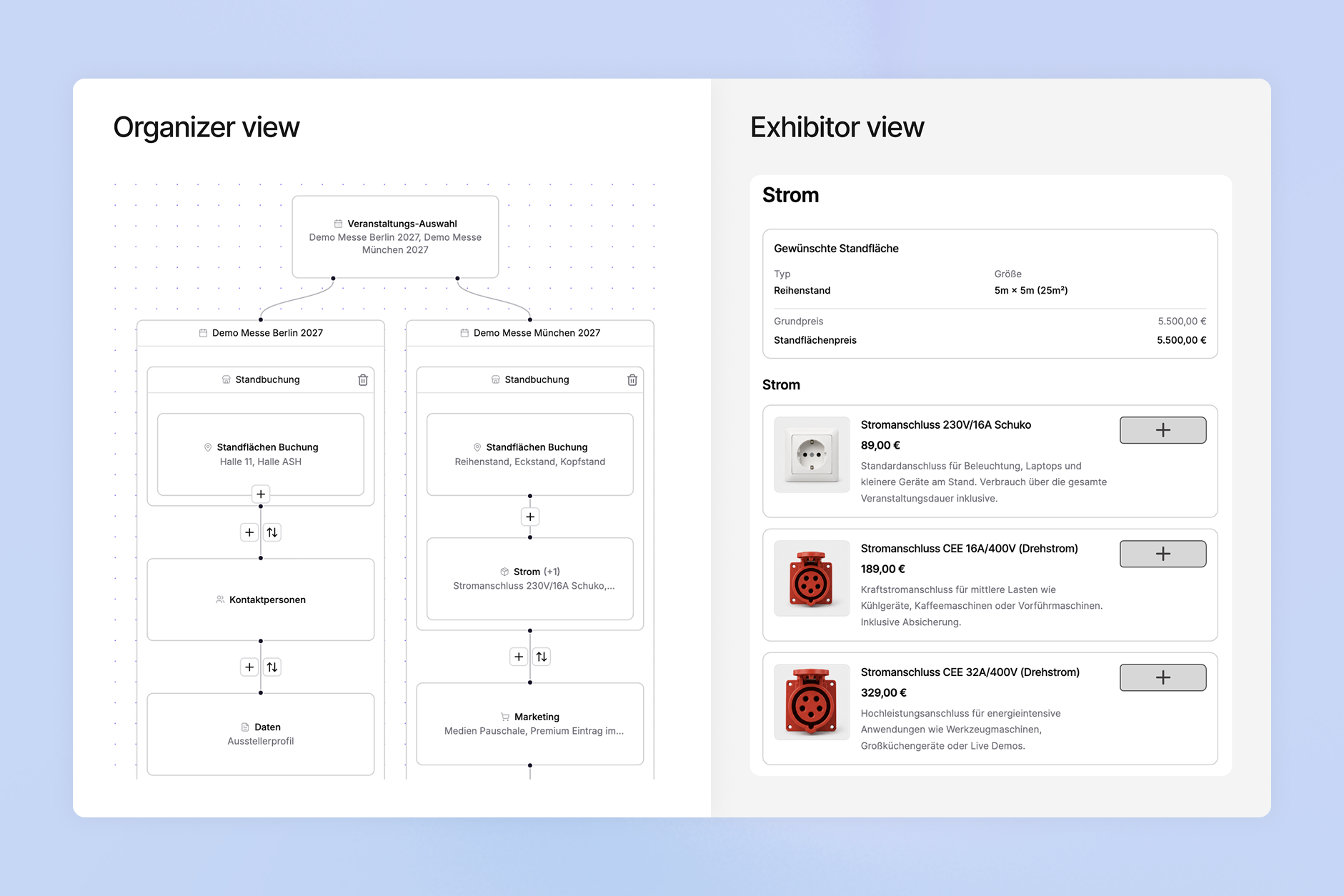
The daily reality for many organizers looks different: offers, placement proposals, and reservations run across separate systems, manually via email and attachments. This article covers seven booth booking processes that trade show management software like Fairoo automates, and compares each one with the manual workflow.
1. Confirmation email after the booking inquiry
When an exhibitor submits a booking inquiry, they automatically receive a confirmation email with an overview of all booked products and their inquiry. No one on your team has to check incoming requests and answer them one by one. If the exhibitor abandons the booking midway, their progress is preserved in the same browser and they can continue later. One number shows how much work this replaces: since launching in September 2025, Fairoo has sent 20,000 automated emails.
2. Price calculation in the floor plan
In the floor plan designer, the price of every booth space is calculated automatically from booth type, size, and time of booking. Cutouts for pillars or other obstacles are deducted from both the square meters and the price. You can still step in: prices can be manually overridden or discounted, and in the booking form you define early-bird discounts and conditional discounts, for example for startups. The Excel price list maintained in parallel becomes unnecessary.
3. Digital offers with signature
You create offers and counteroffers in a few seconds and provide them to the exhibitor directly in the portal or send them via an encrypted link. Opens and submissions are tracked automatically: you can see at any time when an offer was opened and when it was submitted. As soon as a booth space is planned or assigned, the exhibitor sees, if the organizer chooses, their booth position on the floor plan directly in the offer and signs with a digital signature. Printing contracts, scanning them, and emailing them back is a thing of the past.
4. CRM automations on status changes
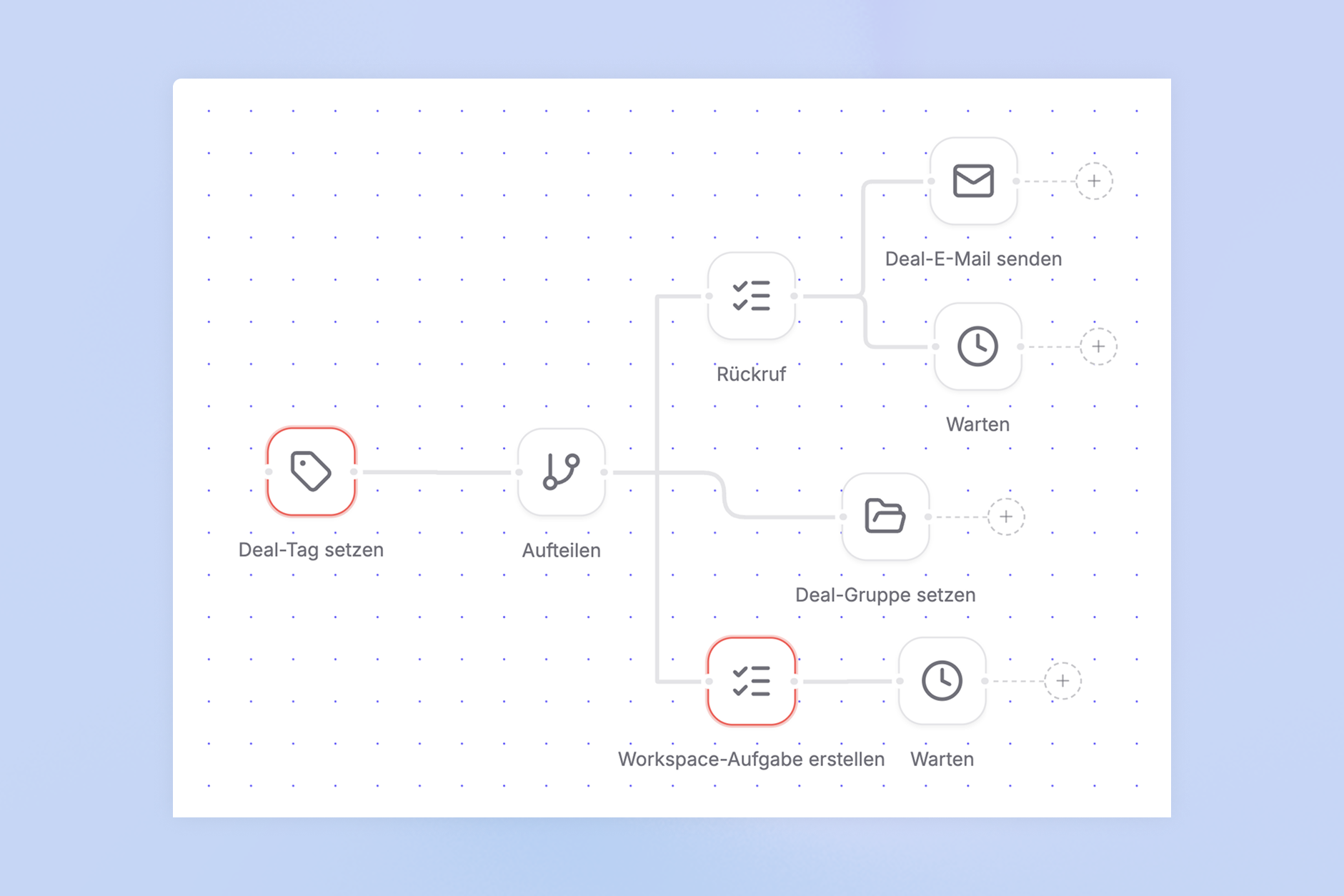
Automations in the Fairoo CRM react to status changes and categories: send an email from the matching template, create a task, or assign a tag. Tasks are also created automatically, for example a callback after a new inquiry. Once set up, these rules run in the background. No lead sits untouched because a follow-up reminder was forgotten in someone's calendar.
5. Reminders per task in the exhibitor portal
In the exhibitor portal, you create tasks with deadlines, such as submitting documentation, placing booked products on the booth space, or booking products from a category. Reminders before and after the deadline go out automatically by email to the people responsible. Your team can see at any time how far along each exhibitor is and where data is missing. Frederic Zwickl, Head of Production at MJ Berlin, reports that missing fire safety certificates were automatically chased via reminders and that the shop and reminders increased product sales by over 30 percent.
6. Availability calculation in the ERP
For inventory items such as power connections, the available quantity is calculated automatically from sold, assigned, and requested units, per inventory item and per event. Quantity changes require a documented reason, and the transaction overview shows when each product was allocated to which order. Time-slot-based products such as forklifts or speaker slots run through a resource calendar with its own capacity per slot. An inventory sheet updated by hand after every booking is no longer needed.
7. Self-service rebooking for the next event
At the running trade show, exhibitors reserve their booth space for the next year themselves, at the booth or in the portal, with prefilled data. The floor plan can be duplicated for the follow-up event: if the rebooking module is used, free booth spaces are pre-reserved for returning exhibitors from the previous year, and prices can be adjusted automatically to the new square meter pricing. Self-service continues after the booking, too: exhibitors book additional services in the shop on their own, and organizers and service providers can be notified about inquiries.
Manual vs. automated: the direct comparison
| Manual process | Automated with Fairoo |
|---|---|
| Confirmation: Every inquiry is answered individually by email | Confirmation email with all booked products is sent automatically |
| Price: Square meters, surcharges, and discounts are calculated in Excel | Price is derived from booth type, size, and time of booking |
| Offer: Create a PDF, attach it, wait for a response | Offer created in seconds, opens tracked, digital signature |
| Follow-up: Reminders live in calendars and people's heads | A status change automatically triggers an email, task, or tag |
| Deadlines: Exhibitors are reminded about documentation one by one | Reminders run automatically before and after the deadline |
| Availability: Inventory lists are reconciled after every booking | Available quantity is calculated from sold, assigned, and requested units |
| Rebooking: Paper forms at the booth, chasing by email | Exhibitors reserve on their own at the booth or in the portal, with prefilled data |
Comparing systems for booth booking automation
If you are comparing systems for booth booking automation, check five criteria:
- Booking flow: Can exhibitors book their booth space themselves, including products, data requests, and a digital signature?
- Pricing logic: Does the system calculate booth prices automatically, or does the team keep maintaining price lists by hand?
- Communication: Do confirmations and reminders run automatically, with traceability for the team?
- Integration: Does the system sync with your existing CRM and accounting systems, or does it demand replacing them?
- Rebooking: Can exhibitors reserve their booth space for the next event themselves?
Fairoo specializes in the exhibitor business of trade shows and is built modularly: you start with one module, such as Offers & Booking or the floor plan designer, and add more as soon as you need them. Existing systems stay in place: contacts and deals sync in both directions with HubSpot or Pipedrive, and invoices flow into your accounting through connections such as sevDesk or lexware Office. Since launching in September 2025, 26 trade shows have run on the platform, with EUR 22 million in processed booking volume.
How can trade show organizers automate booth booking and invoicing?
The booking supplies the data the invoice needs: the booking form collects the billing address and billing company, and the VAT ID can be validated directly. Invoices, partial invoices, and open items are managed per deal and connected to your accounting. In the dashboard, you break down revenue by invoice status, from "not invoiced" to "paid".
Does automation require replacing your existing system?
No. Fairoo replaces neither your CRM nor your ERP. Contacts and deals sync in both directions, and your existing ERP is connected and extended, not replaced. For everything else, an open API is available, and an MCP interface is in development.
All seven processes start with the booking. To see how Fairoo's digital booking and offer flow works in detail, visit the module page Offers & Booking.
Want to automate booth booking for your trade show? Talk to our team.
Request a demo